
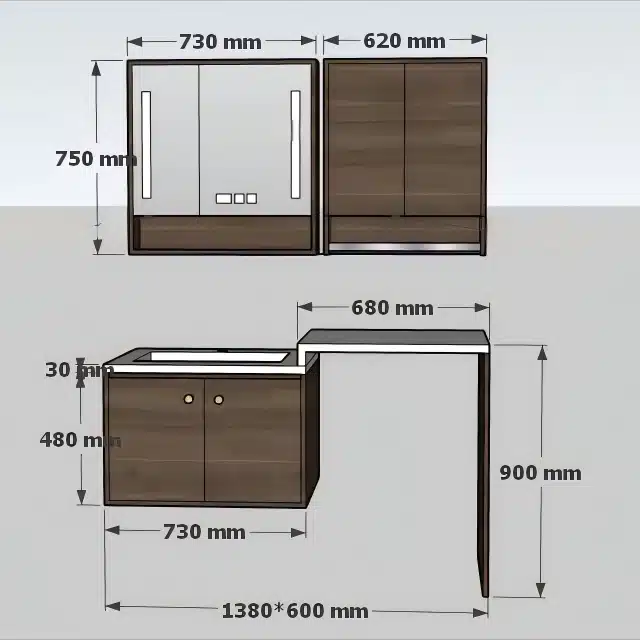
Effective vanity assembly instructions are the critical barrier between a smooth customer installation and a costly product return. When end-users face confusing diagrams or ambiguous steps, the result isn’t just frustration—it’s an immediate spike in support tickets, negative online reviews, and avoidable chargebacks. This single piece of technical documentation can directly erode profit margins and damage brand reputation, turning a well-designed product into a logistical liability.
This guide provides a technical framework for engineering clear, user-centric assembly manuals. We will analyze the usability of pictogram-only formats versus text, the integration of QR codes for video support, and the essential role of exploded diagrams for parts identification. We will also detail the compliance requirements for safety warnings, including anti-tip kits and weight limits, to establish a repeatable system for documentation that reduces user error and protects your business.
The Hidden Cost of Bad Instructions: How Does It Impact Return Rates?
Poor assembly instructions create a direct financial drain by increasing product returns, overwhelming customer service teams, and eroding long-term brand loyalty.
Increased Operational Strain and Service Costs
Unclear instructions directly lead to higher operational costs. When customers struggle with assembly, they either contact customer service or return the product, creating expenses tied to support staff, logistics, and product inspections. These preventable returns are a significant, yet often untracked, cost center that impacts everything from warehouse capacity to engineering resources.
- Each return initiated by assembly confusion requires costly logistical handling, inspection, and restocking.
- Customer service teams become overloaded with calls and emails related to setup problems, diverting resources from other issues.
- Items returned due to poor instructions are often mistakenly categorized as defective, leading to unnecessary rework and analysis.
Erosion of Brand Reputation and Customer Trust
A frustrating setup experience can permanently damage a customer’s perception of a brand. This negative first impression often results in poor reviews and reduces the likelihood of repeat business, impacting long-term loyalty. The initial feeling of excitement after a purchase quickly turns into disappointment, which can overshadow the actual quality of the product itself.
- Customers frequently share negative assembly experiences online, deterring potential buyers.
- The frustration caused by bad instructions can overshadow the actual quality and benefits of the product.
- Poor guidance makes a brand appear unprofessional or unconcerned with the customer experience, weakening trust.
“IKEA-Style” Pictograms vs. Text: Which Format Is More Effective?
While pictogram-only instructions seem cost-effective, a hybrid format combining visuals with supportive text is proven to reduce assembly errors, lower return rates, and cut customer support costs.
The Limitations of Pictogram-Only Instructions
The industry once embraced image-only instructions for their supposed universality, but by 2026, their failures are well-documented. This format creates significant barriers for users with cognitive or visual processing differences like aphantasia or dyslexia, who struggle to interpret spatial diagrams without textual support. Further, visual symbols do not translate consistently across cultures, leading to misinterpretation, assembly errors, and frustrated customers. When complex steps are shown without any text, ambiguity forces guesswork, directly increasing product return rates and straining customer support teams.
| Feature | Pictogram-Only Approach | Hybrid (Image + Text) Approach |
|---|---|---|
| User Accessibility | Excludes users with dyslexia, aphantasia, or spatial processing issues. High risk of cultural misinterpretation. | Accommodates multiple learning styles, making instructions accessible to a much broader audience. |
| Assembly Accuracy | Ambiguous steps increase the likelihood of user error, damage to components, and failed assembly. | Concise text clarifies complex actions, leading to higher first-time success rates. |
| Business Impact | Creates hidden costs through higher returns, increased support tickets, and brand reputation damage. | Reduces operational costs and improves customer loyalty by providing a better post-purchase experience. |
Why Hybrid (Text and Image) Formats Improve Comprehension
The current industry standard is a hybrid model that combines clear illustrations with minimal, supportive text. This dual-format approach is highly effective because it caters to different learning styles simultaneously. Visual learners can follow the diagrams, while others can rely on the text to confirm specific actions or understand complex steps. This clarity ensures users can assemble products correctly on their first attempt, which directly reduces preventable product returns. Previously, creating text for multiple languages was a cost barrier, but modern AI-driven tools now make it simple and affordable to generate accurate, complementary text for visual instructions across global markets.
Create Your Market-Ready Bathroom Collection

QR Codes: How Can They Connect Users to Step-by-Step Video Guides?
QR codes serve as a direct bridge from a physical product to a digital video guide, eliminating user friction while allowing manufacturers to update content and track engagement data in real time.
Bridging Physical Products with Digital Instructions
QR codes create a seamless link between a physical instruction manual and dynamic online video content. This simple tool removes the need for customers to manually search for a website or type a long URL, providing instant access to assembly guides. When a user scans the code printed on the packaging or within the paper manual, their smartphone immediately opens the relevant video tutorial.
This method is highly effective for clarifying complex steps that are difficult to convey with static images. We use it to show detailed assembly procedures, demonstrate correct hardware installation, or provide essential maintenance tips for our bathroom vanities. The code can point to a single, targeted video for a specific task or to a comprehensive playlist customized for the product model, ensuring the user gets exactly the information they need.
Enhancing Content Management and Gathering Analytics
Using dynamic QR codes gives manufacturers significant operational flexibility. We can update the linked video content at any time without changing the code that has already been printed and shipped with our products. This capability is critical for keeping instructions current, correcting errors found post-launch, or adding new tutorials based on customer feedback.
Beyond content management, these codes provide valuable data. We can track scan metrics to analyze user engagement, learning how often, when, and in which geographic locations our video guides are being accessed. This data helps us identify common pain points in the assembly process, pinpointing steps where customers repeatedly seek video help. These insights directly inform future improvements to our products and instruction manuals.
Improving Accessibility and User Experience
Video guides accessed via QR codes cater to a wide range of learning styles, greatly improving comprehension compared to text-only manuals. Visual and auditory instructions make the assembly process far more intuitive, especially for visual learners or those less experienced with DIY projects. Since most modern smartphones scan QR codes natively through the camera app, this feature is accessible to a broad audience without requiring any special software.
- Video formats can clarify complex actions that are ambiguous in static diagrams, reducing user frustration and assembly errors.
- This approach creates a more interactive and supportive experience, which builds customer confidence and satisfaction.
- To guarantee a smooth process, linked videos must be high-quality, concise, and optimized for mobile viewing to avoid long loading times or data consumption issues.

Spare Parts & Exploded Diagrams: Why Are They Essential for Assembly?
Exploded diagrams have evolved from static drawings into interactive digital assets linked to CAD software, directly reducing assembly errors and empowering customers with self-service repair capabilities.
The days of blurry, photocopied diagrams are over. Providing clear, accurate exploded views is no longer a “nice-to-have”; it’s a core part of the product experience that directly impacts your bottom line by reducing returns, support tickets, and incorrect part orders. These diagrams act as a universal language for assembly and repair.
Simplifying Part Identification and Ordering
Modern exploded diagrams are precision instruments, not just illustrations. They are linked directly to CAD files, ensuring every component is accurately represented. When integrated into an e-commerce platform or digital catalog, these diagrams become interactive visual maps. Customers and service technicians can simply click on a part to identify it and add it to a cart, eliminating the guesswork and human error that plague traditional part number lookups.
| Feature | Legacy Approach (Static PDF/Paper) | Modern Approach (Integrated Digital Asset) |
|---|---|---|
| Data Source | Manual illustration, potential for human error. | Directly linked to CAD software, ensuring 1:1 accuracy. |
| User Interaction | Static view only; requires manual part number lookup. | Interactive; click-to-order parts directly from the diagram. |
| Primary Use Case | Reference for assembly or manual repair. | E-commerce spare parts sales, remote troubleshooting, and self-service. |
Reducing Assembly Errors and Support Costs
A clear exploded view removes the ambiguity from assembly. It shows exactly how parts connect, which is far more effective than text alone. Getting the assembly right the first time is crucial—it prevents product failures, expensive warranty claims, and frustrated calls to your support team. For B2B clients and distributors handling custom vanity configurations, these diagrams are non-negotiable for ensuring installations are done correctly and efficiently.
Enabling Self-Service and Remote Troubleshooting
High-quality diagrams empower customers to handle their own troubleshooting. When a user can visually identify and confirm the exact component before starting a repair, their confidence skyrockets. This self-service model is becoming a market expectation; it improves the customer experience and frees your technical support team to focus on genuinely complex issues instead of simple part identification questions. Using 3D visualization and interactive models takes this even further, making remote support incredibly efficient.
Safety Warnings: What Are the Requirements for Anti-Tip and Weight Limits?
Meeting mandatory anti-tip standards like ASTM F2057-23 isn’t just about compliance; it’s a non-negotiable requirement to prevent product recalls and protect against liability from tip-over incidents.
Mandatory Anti-Tip Device Standards
The ASTM F2057-23 standard is now the law for clothing storage units (CSUs), including chests, dressers, and armoires. This rule mandates that any freestanding unit measuring 27 inches or taller must include an anti-tip device that conforms to ASTM F3096 specifications. This standard became mandatory on September 1, 2023. It’s critical to understand that any product involved in a tip-over incident can be recalled, regardless of its manufacturing date, making compliance essential for both new and existing inventory.
Performance and Stability Testing Protocols
Furniture must pass stringent performance tests that replicate real-world scenarios to ensure stability. These protocols are designed to verify that a unit will not tip over when subjected to conditions like multiple open drawers filled with weight. The tests also simulate the force of a 60-pound child pulling on or interacting with the unit. A product fails testing if it tips over or is supported only by an open drawer, door, or flap, indicating a clear safety risk.
| Requirement Category | Specification Details | Compliance Impact |
|---|---|---|
| Applicability | Clothing Storage Units (CSUs) ≥ 27 inches in height (dressers, chests, etc.). | Mandatory for all new products; older products are subject to recall if an incident occurs. |
| Stability Test | Must withstand force equivalent to a 60 lb child and remain stable with multiple loaded drawers open. | A direct pass/fail test that determines market readiness and reduces liability risk. |
| Warning Label | Permanent label inside the top drawer with a specific three-panel pictogram and text. | Eliminates the need for separate hangtags and ensures the safety message is always visible to the user. |
Permanent Warning Label Specifications
The standard requires a permanent warning label to be affixed in a conspicuous location, typically on an interior side panel of the top drawer. This label is not a simple sticker; it uses a standard three-panel pictogram and prescribed text to clearly communicate tip-over hazards. The content must address proper usage, such as not overloading drawers, and include explicit warnings against allowing children to stand on or climb the unit. It also provides instructions for installing the tip restraint. Under the current ASTM standard, a separate hangtag is no longer required, as the permanent label ensures the warning is not discarded after purchase.
Printing Specs: How Do Paper Quality and Font Size Affect Readability?
The physical properties of paper and the typographical choices of font and layout are not separate decisions—they are a single system that determines whether an instruction manual is clear or confusing.
Details like paper finish, font selection, and line spacing directly control how easily a customer can process assembly instructions. Getting these specifications right minimizes user error and frustration, which ultimately protects your brand from preventable product returns. Ignoring them creates a poor user experience, no matter how accurate the content is.
Optimal Font Size and Type Selection
For printed manuals, the standard for body text is between 10 and 12 points. While 12-point text became common due to old typewriter standards, most professional publications use smaller sizes to balance clarity with space efficiency. A font’s legibility also depends heavily on its x-height—the height of its lowercase letters. Serif fonts, with their small finishing strokes, are proven to guide the reader’s eye through long blocks of text, making them a reliable choice for detailed instructions.
- An 11-point font size provides a versatile balance between readability and efficient use of page space.
- Fonts with a large x-height, like Verdana, often appear clearer than fonts with a small x-height, even at the same point size.
- Serif fonts are the standard for printed books and manuals, while sans-serif fonts work well for headings or on glossy paper where fine serifs can get lost.
How Paper Choice Affects Typography
The paper stock you choose dictates which fonts will perform best. Cream-colored, uncoated paper reduces glare and minimizes eye strain during prolonged reading, creating a better physical experience. This type of paper pairs well with serif fonts, as the texture helps define the characters. Glossy, coated paper, common in marketing materials with heavy photo content, can make thin serif strokes harder to see. It is a better match for clean, bold sans-serif fonts.
- Cream-colored paper is a practical choice for user manuals to reduce reader fatigue.
- Glossy paper is better suited for parts catalogs or marketing inserts where image quality is the priority.
- The final clarity of your instructions depends on the interaction between the ink, the paper’s texture and color, and the font style.
The Importance of Layout and Spacing
Readability isn’t just about the font—it’s about the space around the text. Proper line spacing (leading) and margins are essential for preventing a crowded, intimidating appearance. Giving text room to breathe reduces cognitive load and helps users follow instructions without losing their place. Insufficient white space is a common mistake that makes otherwise clear instructions difficult to use.
- Industry-standard line spacing is between 120% and 150% of the font size.
- For 11-point text, this translates to a leading of approximately 13 to 16 points.
- Maintaining margins of at least 1 inch (2.54 cm) on all sides provides the necessary white space to frame the content and make it easier to parse.
Localization: Why Are Multi-Language Manuals Critical for Global Sales?
Failing to provide instructions in a customer’s native language creates a direct barrier to purchase, increases support costs, and exposes a brand to significant legal risk in regulated markets.
Boosting Sales and Customer Loyalty in New Markets
Providing manuals in a customer’s native language removes a major barrier to purchase and is a direct driver of revenue. Research confirms that 76% of online shoppers are more likely to buy from the same brand again if after-sales support is in their language. More importantly, 40% will not purchase from websites in other languages at all. For a global supplier like FocusCabinet, this translates directly to higher conversion rates and stronger distributor relationships across dozens of countries.
- Increases the likelihood of purchase by making product information accessible.
- Builds trust and brand loyalty, encouraging repeat business from international clients.
- Unlocks market potential in non-English-speaking regions where competitors may not offer localized support.
Reducing Customer Service Costs and Improving User Experience
Clear, professionally translated instructions prevent common assembly or usage errors that lead to support calls and product returns. When users can understand the manual without ambiguity, it reduces frustration, accelerates product setup, and lowers the burden on customer service teams. This strategy directly improves operational efficiency and protects the brand’s reputation for quality by ensuring a positive first experience with the product.
- Minimizes incorrect assembly or operation, leading to fewer support tickets.
- Decreases product return rates associated with user misunderstanding.
- Enhances the overall customer experience from unboxing to daily use.
Meeting Legal and Regulatory Requirements Across Borders
In many regions, providing safety warnings and operating instructions in the local language is a legal requirement. For manufacturers complying with standards like CE in Europe and AS/NZS in Oceania, localized manuals are non-negotiable for market access. Failure to do so can result in legal liability, product recalls, and fines. Proper localization is a critical component of risk management for any brand shipping products internationally.
- Ensures compliance with country-specific regulations for consumer products.
- Clearly communicates critical safety information to prevent accidents and liability.
- Facilitates smoother customs clearance and market entry for global shipments.
Conclusion
Clear assembly instructions are a critical part of the user experience, directly impacting customer satisfaction and costly return rates. Investing in logical diagrams, essential safety warnings, and accessible digital guides protects your brand’s reputation. This ensures end-users assemble their vanity correctly, enhancing the product’s value and longevity.
Contact us to see how our user-focused instructions complement our E-commerce Ready packaging. Request a refundable sample to review our commitment to quality, from the factory floor to the final installation.
Frequently Asked Questions
How to write furniture assembly instructions?
Effective furniture assembly instructions prioritize clarity and simplicity. Start with a complete inventory list, including labeled diagrams of all parts and hardware. Use high-quality, isometric illustrations for each step rather than text-heavy descriptions. Number each part and correspond those numbers to the diagrams. Crucially, highlight the orientation of parts (e.g., “Front,” “Top”) and use warning icons for critical steps to prevent errors. The sequence must be logical, building from the base upwards, and a “Tools Required” section should be included at the beginning.
Importance of user manuals in furniture?
High-quality user manuals are critical for reducing operational costs and protecting brand reputation. Unclear or incomplete instructions are a primary driver of customer dissatisfaction, leading to product returns that are often miscategorized as defects. These returns generate significant hidden costs, including customer service time, logistical expenses, and operational rework. Clear, comprehensive manuals prevent assembly friction, align customer expectations with the final product, and serve as an essential tool for cost control and customer retention.
Best assembly instruction software?
The industry standard for creating assembly instructions involves a mix of 3D CAD and interactive platforms. Software like SolidWorks Composer or Autodesk Inventor is used to generate clean, exploded views directly from engineering models. For 2D illustrations and layout, the Adobe Technical Communication Suite, particularly Adobe Illustrator, remains a top choice. However, leading companies now use interactive 3D instruction platforms like BILT or Canvas Envision to deliver step-by-step animated guides directly to a customer’s device, significantly reducing errors.
QR code for installation video?
Yes, including a QR code linked to an installation video is a modern best practice. It enhances the customer experience by providing a dynamic, visual supplement to static printed manuals. Videos are exceptionally effective at demonstrating complex steps, showing proper tool usage, and clarifying orientations that can be ambiguous in diagrams. This approach caters to different learning styles, reduces assembly errors, and ultimately minimizes customer frustration and potential product returns. It is a low-cost, high-impact feature.
Anti-tip kit requirements?
In the U.S., the STURDY Act mandates that clothing storage units (like dressers, chests, and bureaus) over a specific height must include a compliant anti-tip kit. This is a critical safety requirement to prevent injuries or fatalities from furniture tip-overs. The product itself must pass stability performance tests, and the provided kit must contain all necessary hardware (e.g., brackets, straps, screws) and clear instructions to securely anchor the furniture to a wall. Compliance is not optional and is enforced by consumer product safety commissions.
Common assembly mistakes vanities?
The most common assembly mistakes for vanities involve plumbing and improper fastening. These include reversing the hot and cold water supply lines, failing to use plumber’s putty or thread seal tape on the drain assembly leading to leaks, and over-tightening fittings which can crack the ceramic sink. Another frequent error is not securing the vanity cabinet to wall studs, causing it to be unstable. Finally, users often misalign cabinet doors or drawers by not correctly adjusting the hinge and slide hardware after the main assembly is complete.




0 Comments